Overview Link to heading
For those of you just joining, I am working on a personal AI assistant that is intended to manage my digital life, synthesizing all the information I come across on a daily basis. I am calling it the Librarian, after Neal Stephenson’s AI agent from his novel “Snow Crash”. But where to actually begin?
Well, first off, the Librarian needs a brain. Every query I send it, every research task, every intelligence synthesis — all of that reasoning has to happen somewhere. That somewhere is a Mac Mini M4 sitting on a shelf in my server rack, running completely headless, accessible only over SSH, serving local AI inference to the rest of my homelab stack.
This is how I set it up.
Why Local Inference Link to heading
The easy path is using a cloud API. OpenAI, Anthropic, Google — all of them will happily accept your money and your data in exchange for inference on their hardware. For most projects that’s fine.
For the Librarian it isn’t. The whole point of the system is that your most personal data — your reading habits, your field intelligence, your health metrics, your financial picture — flows through it continuously. Sending that to a cloud API means trusting a third party with a detailed picture of your life.
And its not that I necessarily think these companies are or will do anything malicious with the data you provide to them, its that you never can truly know what they are doing with your data or who has access to your data to begin with.
Local inference means the models I run live on hardware I own. Queries never leave the network. No API keys, no usage caps, no data retention policies to read carefully. The Librarian thinks entirely on my hardware or it doesn’t think at all.
The Hardware Link to heading
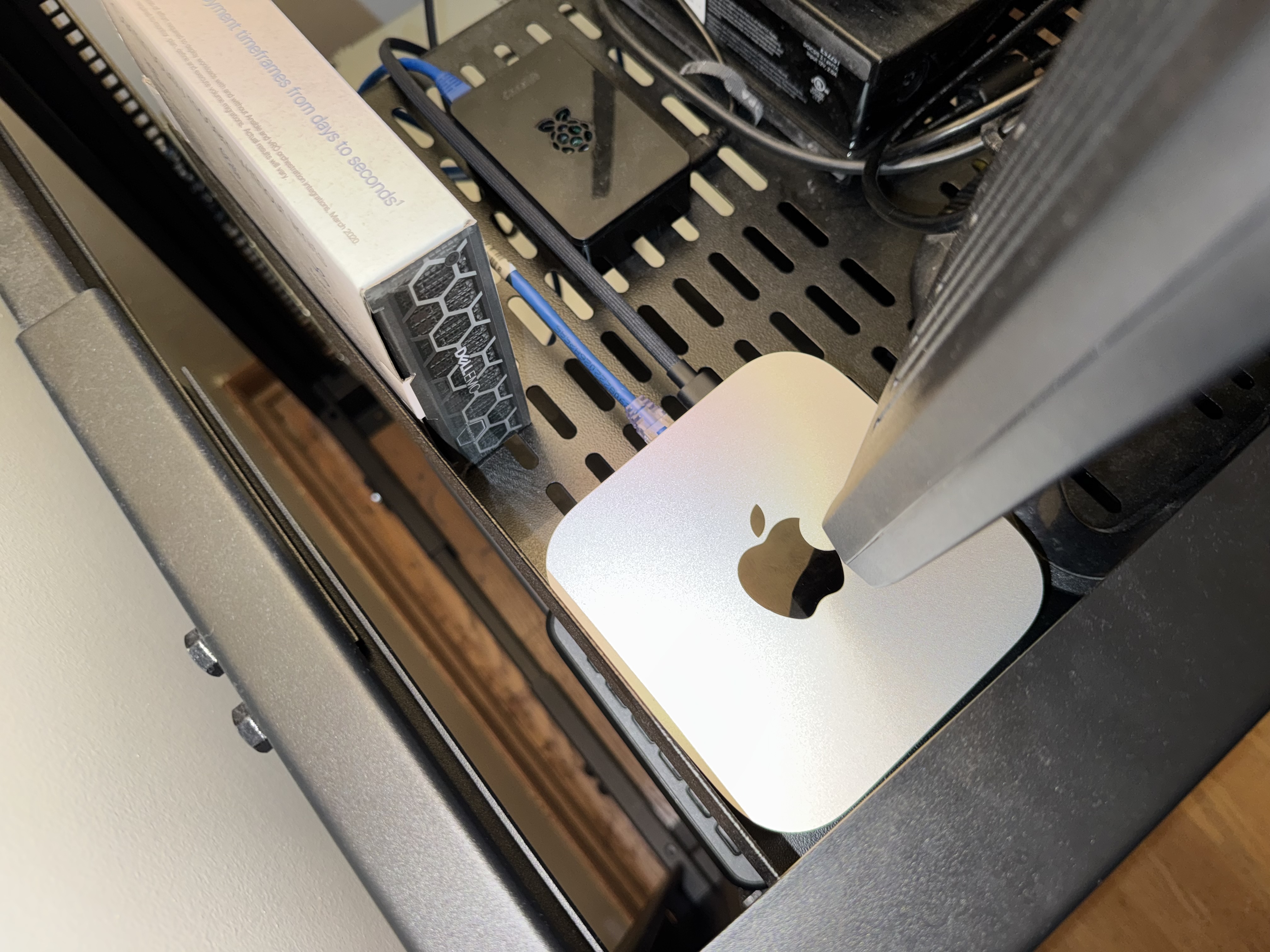 The hardware I chose, at least for this iteration of the Librarian, was the Mac Mini M4 with 16GB unified memory. Apple Silicon’s unified memory architecture means the CPU and GPU share the same memory pool — no separate VRAM allocation, no memory copying between CPU and GPU, i.e. more efficient for running this exact use case. A 9 billion parameter model at Q4 quantization sits in roughly 6.6GB, leaving headroom for the OS and other inference services.
The M4’s Neural Engine handles the inference workload efficiently. Power draw at idle is around 10-15W. Running flat out on inference it stays cool thanks to the active cooling — unlike a MacBook Air which throttles after sustained load. For a server that needs to answer queries at any hour, thermal stability matters.
I went with the 16GB model simply because its the cheapest, usable entry point into running efficient local AI inference. There are plenty of other options available for something like this that would definitely perform better (like a more expensive Mac Mini M4), but as a simple experimental deployment and proof of concept project I think it will get us pretty far.
Initial Setup Link to heading
Unfortunately we can’t get the computer set up headless from the jump. The setup wizard just needs to be quickly run through.
For this use case, we skip the Apple ID entirely — there’s no reason a headless inference server needs an App Store account, especially considering the actual OpenClaw gateway will be running in a virtual machine on my Dell PowerEdge server instead of locally on this Mac. We also disable FileVault — a headless server that requires a password on boot to decrypt the disk will sit unreachable after every power outage. Not useful and unnecessary considering its sitting in my home.
After the wizard, we open Terminal and disable sleep settings:
sudo pmset -a sleep 0
sudo pmset -a disksleep 0
sudo pmset -a displaysleep 0
sudo pmset -a autorestart 1
The autorestart 1 flag means the machine boots automatically after a power failure. Combined with the sleep settings, the Mac Mini will now run indefinitely without ever going dark.
We also enable SSH while we’re here to be able to access remotely:
sudo systemsetup -setremotelogin on
Finally, we just set a recognizable hostname to make the SSH connections easier to remember:
sudo scutil --set HostName ai-inference
sudo scutil --set LocalHostName ai-inference
sudo scutil --set ComputerName ai-inference
From this point everything happens over SSH. The Mac Mini is now just infrastructure.
Installing Ollama Link to heading
Ollama is the inference runtime that handles model management, quantization, and serving the API endpoint. At first I tried installing Ollama through Homebrew, which is a package manager for macOS for installing CLI tools and applications, similar to yum or dnf on Linux.
I installed Homebrew first:
/bin/bash -c "$(curl -fsSL https://raw.githubusercontent.com/Homebrew/install/HEAD/install.sh)"
Then installed Ollama:
brew install ollama
The Network Binding Problem Link to heading
Here is where things got interesting.
By default, Ollama binds to 127.0.0.1:11434 — localhost only. Queries from other machines on the network get refused. For a server that’s supposed to accept inference requests from the OpenClaw gateway running on a different server, this is obviously a problem.
The documented solution is to set the OLLAMA_HOST environment variable to 0.0.0.0:11434. The documented way to do this on macOS is via launchctl setenv. The documented way does not reliably work when Ollama runs as a LaunchAgent through Homebrew Services, because LaunchAgents require an active GUI session to load — and a headless server accessed entirely over SSH doesn’t have one. At least that’s the hunch.
I went down this particular rabbit hole for longer than I’d like to admit. Editing the Homebrew plist. Creating separate LaunchAgent plists. LaunchDaemon plists. VNC to enable auto-login. None of it consistently worked.
The solution that actually works:
# Create a startup script
cat > ~/start-ollama.sh << 'EOF'
#!/bin/bash
export OLLAMA_HOST=0.0.0.0:11434
/usr/local/bin/ollama serve &
EOF

# Making the script executable
chmod +x ~/start-ollama.sh

# Add to crontab
crontab -e
# Add this line:
# @reboot sleep 30 && /bin/bash /Users/dylan/start-ollama.sh
A cron job with @reboot runs at system level, doesn’t require a GUI session, and the inline environment variable means Ollama starts with the correct binding every time. The 30 second sleep gives the OS time to fully initialise before Ollama tries to start.
To verify it’s working after a reboot, from a separate computer:
curl http://{MacMiniIPAddress}:11434/api/tags
Initially running this threw an empty model list since I hadn’t pulled any models yet. Still a success regardless since the curl was able to connect to the inference server at all.
Pulling the Models Link to heading
With the server reachable, next step was obviously to pull some models:
ollama pull qwen3.5:9b       # Primary Librarian model — ~6.6GB
ollama pull qwen2.5vl:7b     # Vision model for image analysis — ~5GB
Why Qwen3.5 9B Link to heading
After looking into it, it seems the community rates Qwen3.5 9B as the best all-rounder for my infrastructure with the low end RAM specs. Qwen3.5 9B is the correct choice for the Librarian’s intelligence role on 16GB hardware. It scores 81.7 on GPQA Diamond — a general knowledge and reasoning benchmark — compared to roughly 49 for Llama 3.1 8B, the previous community standard. It supports up to 262K context, has a thinking mode that can be toggled on or off per request, and fits in approximately 6.6GB at Q4 quantization.
The one caveat I came across was Qwen’s thinking mode. By default Qwen3.5 engages extended chain-of-thought reasoning — useful for hard problems, but can be kind of a pain for conversational use where it can loop indefinitely. The fix is simple, passing "think": false at the top level of API calls:
curl http://{MacMiniIPAddress}:11434/api/generate \
  -d '{
    "model": "qwen3.5:9b",
    "prompt": "Your query here",
    "stream": false,
    "think": false
  }'
For the Librarian’s default behavior I need it to be fast, responsive, and conversational — like how the Librarian behaves in the novel. For escalated deep research tasks, we will enable the extended thinking functionality as that would actually benefit from this kind of reasoning.
The Librarian Model Link to heading
Rather than calling the base model directly, I created a named Ollama model with tuned parameters:
cat > ~/Modelfile-librarian << 'EOF'
FROM qwen3.5:9b
PARAMETER num_ctx 32768
PARAMETER temperature 0.7
EOF

ollama create librarian -f ~/Modelfile-librarian
num_ctx is the context window — how many tokens the model can hold in working memory at once. You can think of it as the model’s attention span for a single conversation. The default in Ollama is 4,096 tokens, which sounds like a lot until you factor in a detailed system prompt, several turns of conversation, and a few retrieved Obsidian vault notes arriving simultaneously. I suspect the context window will fill up fast. Setting it to 32,768 gives the Librarian enough headroom to hold a long research session, a chunk of retrieved context, and its own identity instructions without anything falling off the back end (or so I hope, won’t actually know until OpenClaw is tested). When context fills up the model starts forgetting the earliest parts of the conversation — for an intelligence assistant that’s supposed to synthesize information across a session, that context loss destroys its whole use case.
temperature controls how the model samples its next token — essentially how adventurous or conservative it is when choosing what to say. At 0.0 the model always picks the single most statistically likely next word, which produces consistent but repetitive, mechanical-sounding output. At 1.0 and above it starts picking less likely tokens more often, which produces creative and varied output but at the cost of coherence and accuracy. 0.7 sits in the middle ground — coherent and grounded enough for factual intelligence work, with enough variation that responses don’t feel like they were provided by HAL. If you’re using the model for precision tasks like parsing structured data or generating code, lower is better. For anything creative, higher is fine. The Librarian’s OpenClaw configuration files will further tailor the model’s behavior, providing additional context.
Security Model Roster Link to heading
At its core, the Librarian is intended to be a personal intelligence and security system. General AI assistants are trained to hedge on security-related technical questions by design for very clear reasons, the cloud model platforms do not want to enable the use of their technology for malicious purposes. Fair enough. However, for a private local system doing legitimate security research and certification training that would benefit from the use of an always available source of knowledge that can critique your work, those restrictions create friction without adding value.
The full model roster handles this with role separation:
- librarian — Qwen3.5 9B tuned for general intelligence and vault work
- qwen3.5:9b with think:true — Deep reasoning and research synthesis
- dolphin-llama3:8b — Unrestricted general model for security research
- huihui_ai/qwen2.5-coder-abliterate:7b — Uncensored coding model for security tooling
The uncensored models use abliteration, which is supposedly a technique that removes the refusal direction from model weights without retraining. The underlying capability is preserved; only the safety-trained restrictions are removed. Running these locally on a private network is appropriate for this private stack.
Verifying the Full Stack Link to heading
With everything running, a final verification from the PowerEdge confirms end-to-end connectivity:
# List available models
curl http://192.168.0.145:11434/api/tags

# Test inference
curl http://192.168.0.145:11434/api/generate \
  -d '{
    "model": "librarian",
    "prompt": "Confirm you are operational.",
    "stream": false,
    "think": false
  }'
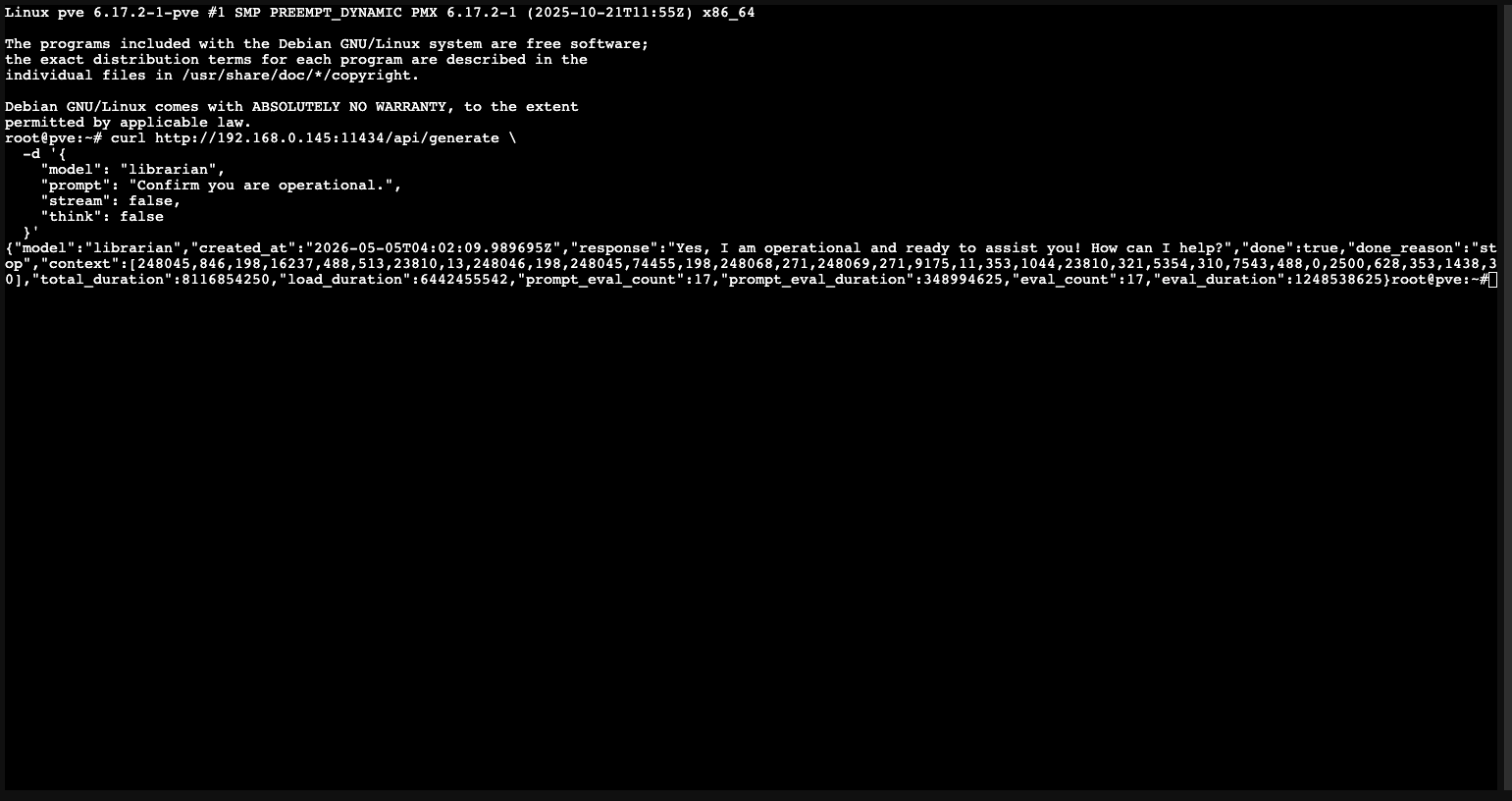 A coherent response in under 60 seconds confirms the inference server is live, the model is loaded, and the PowerEdge can reach it over the LAN.
The Mac Mini is now infrastructure. It sits on a shelf, draws 10-15 watts, and answers queries from the rest of the homelab stack without ever needing attention. The Librarian has a brain.
Next: deploying OpenClaw on the PowerEdge and giving the Librarian a way to talk back.